
Junk Cleaner Download App | Free Android Phone Cleanup Tool
| Updated | 3 Sept 2026 |
| Size | 54MB |
| Version | V1.0.0 |
| Requirements | Android 5.0 or Above |
| Downloads | 50K+ |
Description

Junk Cleaner is a free Android utility app that clears hidden unwanted files and frees up internal device storage. Many smartphones run slow because temporary logs, old download file, and hidden app caches fill up internal memory. This light software offers a simple one-tap solution to scan your mobile device, locate useless items, and restore lost space in seconds. You can easily check total space, manage installed programs, test internet connection speed, and organize media folders without losing important personal files.
What is Cleaner Junk Cleanup App?
Smartphones accumulate invisible digital trash every single day. Every time you open websites or view social media posts, your phone saves small temporary files. Over several weeks, these tiny bits create a huge block of useless data.
The Phone Junk Cleanup tool solves this exact problem for Android users. Created by developer HANFU GIRL, Version 1.0 brings a very simple visual interface to manage mobile space. The total download size remains small, so it installs quickly on almost any smartphone model.
Many users run out of room for new photos or software updates. This space saver scans your whole internal drive in just a few moments. Then it shows you which items you can safely erase. It never deletes personal information unless you approve the action yourself. Therefore, you stay in total control of your mobile content at all times.
How to Use Android Junk Cleaner Step by Step
- Open the Google Play Store on your Android smartphone or Visit Liteapps.
- Search for the phone cleaner app free download and tap the Install button.
- Tap the new icon on your home screen to open the program.
- Grant the required file permissions so the scanner can read your memory folders.
- Press the large Clean Junk button on the main dashboard to begin scanning.
- Review the list of detected trash, cache entries, and temporary items on your screen.
- Select the items you want to erase and confirm your deletion choice.
- Visit the File tab to locate heavy video clips or unused ZIP archives that take up extra space.
- Delete unnecessary media files to reclaim maximum free storage space.
Key Features of the Phone Junk Cleaner
Smart System Sweeper
The scanning engine searches deep inside internal memory folders. It spots old logs, leftover residual data, and hidden cache items. Removing these items helps your phone run smoothly without freezing.
Clean APKs Tool
Many users download installation packages called APK from web browsers. After installing the Junk Cleaner, these installer files stay inside your download folder forever. The Clean APK tool locates these forgotten installer files so you can remove them with a single tap.
Application Manager
This tool displays a clear list of all installed programs on your device. You can view how much space each program consumes in your internal space. If you find old applications that you never open, you can quickly uninstall them directly from this screen.
Speed Test Utility
Internet connection speed affects your daily online experience. This storage cleaner includes a built-in speed test tool directly on the main dashboard. You can check your upload and download rates without opening separate browser pages.
Media Category Organizer
The file section divides your storage into organized groups such as Images, Videos, Audio, Documents, Downloads, and Zips. This organization helps you spot big size files and erase unwanted recordings effortlessly.
Exploring the User Interface of the Digital Phone Cleaner Machine
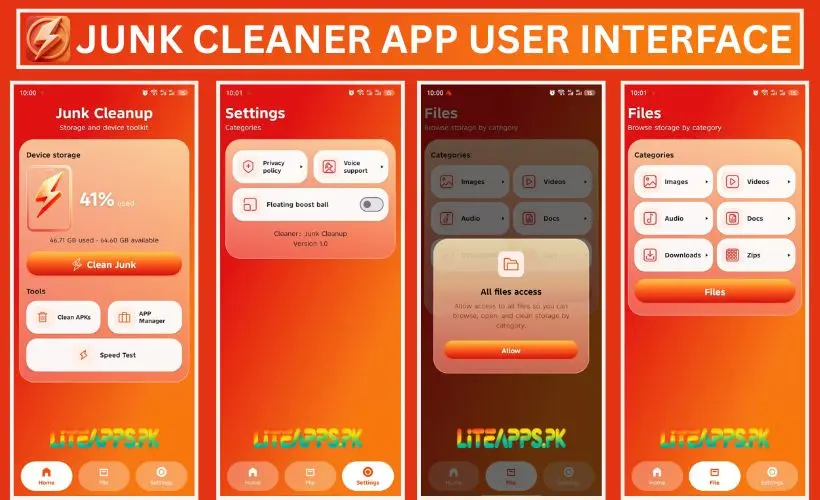
When you launch the program, the main screen presents a bright orange layout. At the top section, you immediately see a big percentage display showing your current storage usage. For example, it can show 41% used along with exact numbers like 46.71 GB used out of 64.60 GB available space.
Right below this memory meter sits the red button labeled Clean Junk. Tapping this main button starts a rapid scan across your entire system. Further down the screen, you can see the secondary tools area. Here you find short shortcut tiles for Clean APKs, APP Manager, and Speed Test.
At the bottom edge of your display, a clean navigation bar holds three main tabs: Home, File, and Settings. Switching between these main sections takes only one simple touch on your touch screen.
Organizing Files by Category
The second main tab is named File. When you tap this section, the tool groups all stored content into tidy visual boxes.
- Images: View all saved pictures, camera photos, and saved screenshots in one list.
- Videos: Browse recorded clips, family movies, and saved media files easily.
- Audio: Find music tracks, voice notes, and audio recordings.
- Docs: Access text files, PDF documents, Word sheets, and digital books.
- Downloads: Check items downloaded directly from internet browsers or message applications.
- Zips: Locate compressed archive files that consume hidden space on your phone.
Settings Menu and Extra Options
The third navigation icon opens the Settings panel. This menu contains helpful features and safety info for every user.
- Privacy Policy: Tapping this option opens the security policy written by developer HANFU GIRL. It explains how the Junk Cleaner protects your personal data.
- Voice Support: This extra feature provides voice assistance and help options for users who prefer listening to spoken guidance.
- Floating Boost Ball: You can turn on a small floating ball icon that stays on your phone desktop screen. Tapping this floating ball allows you to clean system memory instantly without opening the main app.
Why Mobile Device Storage Fills Up so Quickly
Every time you open software, it saves temporary memory called cache data. Internet browsers store images so web pages load faster during your next visit. Social media tools save video previews automatically. Over several months, these cached files accumulate into gigabytes of invisible garbage.
Chat apps also download photos and video clips automatically into hidden folders. Old software installation files stay inside your download folder long after installation finishes. Duplicate images from your camera also consume gigabytes of valuable room.
Using a dedicated junk cleaner every week removes these unnecessary items safely. Consequently, your phone stays responsive, loads applications faster, and avoids annoying low storage warnings.
Data Safety and Privacy Protection
Security remains a major concern when users download system utility programs. Cleaner: Junk Cleanup uses encrypted connections to protect user data during operation.
Developer HANFU GIRL clearly outlines its privacy policies within the application settings. The app requires file storage access purely to scan, categorize, and erase user-selected garbage items.
Furthermore, the software previews detected files on your screen before performing any deletion. Therefore, you never risk losing valuable personal records unexpectedly. The system does not erase private photos or saved contacts without your direct tap.
Key Advantages of Using This Cleaner Tool
Choosing this lightweight software gives users several distinct benefits:
- Lite weight App Size: The program uses minimal internal memory, making it ideal for budget smartphones with limited hardware.
- Simple Dashboard Controls: Big visual buttons and clear titles allow young children or elderly users to navigate without confusion.
- Rapid System Scanning: Deep memory scans complete in just a few seconds.
- Built-in Network Speed Monitor: The built-in speed test tool eliminates the need for separate network checking software.
- Floating Desktop Shortcut: The desktop boost ball offers instant system optimization with one quick tap.
Essential Tips to Maintain Free Storage Space on Android
Besides running a cell phone cleaner app, you can practice these easy habits to maintain high device performance:
- Clear cache memory every week using the APP Manager tool.
- Transfer high-resolution personal photos and long home videos to cloud storage platforms.
- Delete installation APK files from your downloads folder right after completing new software setups.
- Uninstall mobile games or programs that you have not opened during the past month.
- Turn off automatic media downloads inside instant messaging applications.
- Check your compressed ZIP archive folder regularly to remove old extracted folders.
Frequently Asked Questions
Yes, this software is completely free to download and use on Android smartphones via the Google Play Store.
No, the scanner only targets useless cache files and temporary system logs. It shows a preview list before deleting anything, so your personal pictures remain safe.
It is a convenient desktop shortcut button that stays on your phone home screen. Clicking it cleans background temporary memory instantly without launching the main application.
Running a complete system scan once or twice every week is enough to keep your device clean, fast, and organized.
Conclusion
Keeping an Android device fast and clutter-free does not require complicated technical skills. Junk Cleaner offers a straightforward way to identify hidden cache items, manage heavy applications, and free up digital memory in seconds.
By running weekly system checks and using built-in features like network speed testing or the floating boost icon, users can enjoy a responsive mobile experience without running out of internal capacity. Download this free storage manager today to take complete control over your handheld device.
Important Disclaimer
We are not responsible for any loss of personal records or accidental file deletions that may occur while using storage management tools. Users must review all selected items and permissions carefully before confirming any deletion actions inside the application.
Download links
How to install Junk Cleaner Download App | Free Android Phone Cleanup Tool APK?
1. Tap the downloaded Junk Cleaner Download App | Free Android Phone Cleanup Tool APK file.
2. Touch install.
3. Follow the steps on the screen.